
I have been working with Microsoft D365 Customer Service for many years. How did I not know about status reason transitions?!?
” You can modify the status reason column options for the Case table and custom tables to define which other status reason options people can choose.“
This is a configuration setting you can utilize to hide/show status reason options. If its capabilities fit your need, then you don’t need to add form JS. Yay!
Key things to note:
- works for the Case table and custom tables
- each status reason option for an active status must allow at least one path to an inactive status
- only available in the classic UI
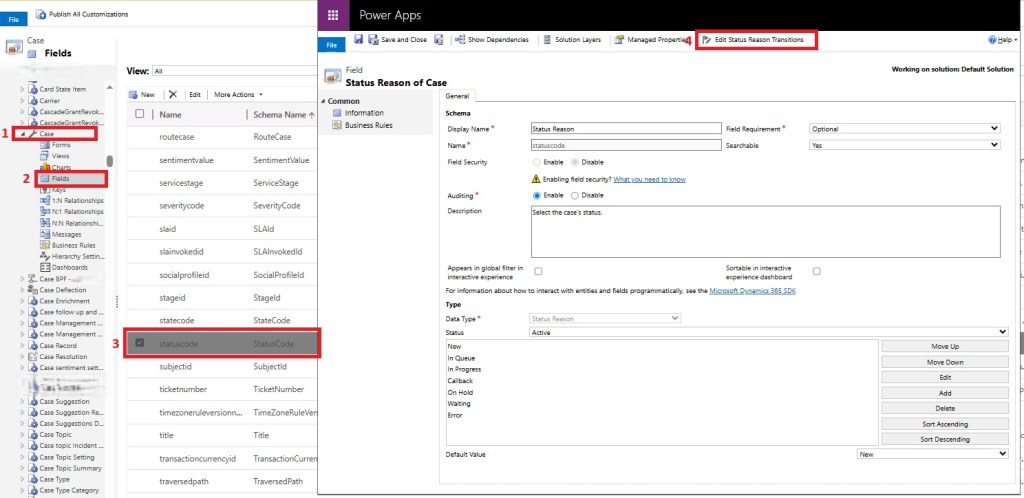
In the classic UI, go to Case > Fields and open the Status Reason field. Click the Edit Status Reason Transitions button.
Check the box to Enable Status Reason Transitions. Then click the gray button on the right of each row to make your New Status Reasons selections.

” …each status reason option for an active status must allow at least one path to an inactive status. Otherwise you could create a condition where it would not be possible to resolve or cancel the case. “
In the example above,
- If the case status reason is New, the only other options I would see in the status reason drop down on the case form are: In Queue and On Hold.
- If I were to try to Resolve the case, the only status reason options I would see are: Completed and Canceled.
- If I were to try to Cancel the case, I would not see any options. (That is because this particular client chose to hide the Cancel button and just add a custom Resolved status reason option for Canceled.)
- If the case status reason is In Queue, the only other options I would see in the status reason drop down on the case form are: In Progress and On Hold.
- … etc. etc. (you get the idea!)
When you’re done configuring the desired options, click OK.
With every configuration change, of course, we have to test to confirm it is working as expected.
 The Low-Code Logbook
Leave a comment