
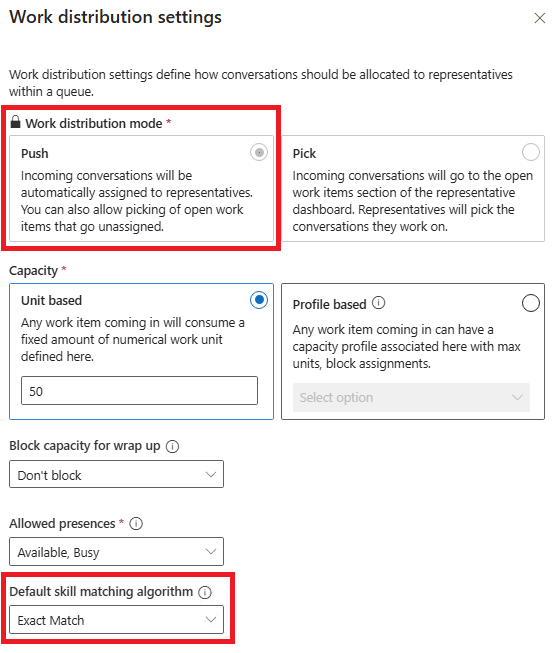
In December 2024, we setup a new Record Workstream for Cases with the Work distribution mode set to Push. The label in the Work distribution settings pane read “Skill matching algorithm” and it defaulted to Exact Match.
Thankfully, Microsoft has now corrected the label to Default skill matching algorithm, since the omission of the word “Default” was causing some confusion.
Navigating to Queues > Advanced queues > Manage, and then selecting one of the queues where records are routed within this Workstream, is where we configured the Assignment methods. We created a new custom assignment method.
The main issue and the purpose of this blog post arose when creating the Assignment Rules.
In the Conditions section, the row for User skills defaulted to the Skill matching algorithm selected on the Workstream. It still does that today, hence the label update to Default skill matching algorithm. Makes sense.

What doesn’t make sense is why Exact match would default on a new Assignment rule for a custom Assignment method when the exact match algorithm was not available with custom assignment methods at that time. The documentation said, “You’ll need to write rules to achieve exact match for the custom assignment method” but didn’t really give any guidance on how or provide examples of ways to achieve this.
“You’ll need to write rules to achieve exact match for the custom assignment method”
So what was our solution?? Fortunately for us, this client’s requirements were that only 1 skill be assigned to each case. That simplified things for us.
- Add a text area column to the User table for “Skills List”
- Add automation to set and maintain the value of the Skills List column with a comma separated list of the user’s assigned skills
- Add a text column to the Case table for “Skill ID”
- Update the automation we had in place that set the Skill on the Case to also capture the Skill ID in the new text field
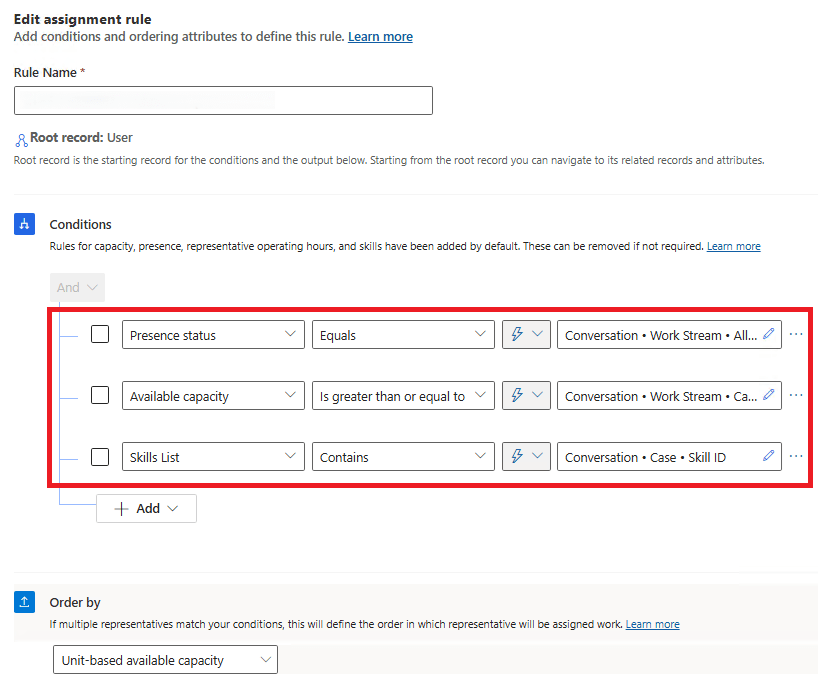
- Configure the assignment rule to include a condition for “Skills List contains Case Skill ID”

I will note, the documentation was updated July 2025 and now reads, “You must configure presence, capacity, and skill-matching rules in the custom assignment method because the default settings defined for the workstream won’t be used in custom assignment method.”

“You must configure presence, capacity, and skill-matching rules in the custom assignment method because the default settings defined for the workstream won’t be used in custom assignment method.”
Thankfully, the Assignment rules we configured included conditions for all three: presence, capacity, and skills match.
I wonder when these core functionalities will be incorporated into custom assignment methods??
 The Low-Code Logbook
Leave a comment