
Mavim is one of several business process management (BPM) platforms you can find in the Azure Marketplace Apps. Mavim acts as a centralized process repository. It is well integrated with the Microsoft ecosystem, using Visio for diagrams and Word for descriptions. Within the tool, you can create your own metadata fields and create relationships between the processes. It allows for multi-stakeholder collaboration and has version control. In addition, Mavim has some analytical capabilities that allow for identification of bottlenecks, redundancies, and opportunities for optimization.
It is advertised as “supporting the Success-by-Design methodology” as it facilitates the Initiate phase where you are designing/re-designing processes and doing your fit-to-standard and fit-gap analysis. Then after go-live, the process visualizations and descriptions are valuable for training and onboarding new users.
There are pre-import instructions for downloading Microsoft’s D365 business process catalog and a solution with a pre-built Power Automate flow for importing the catalog into Mavim, followed by step-by-step import instructions available online.
I summarized what I read online below.
What is Mavim?
You can import Microsoft’s catalog of business processes into the Mavim business process management (BPM) platform.
You can find Mavim in the Azure Marketplace Apps
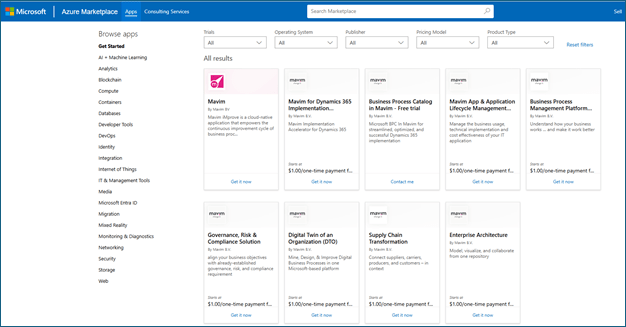
Mavim offers a comprehensive solution tailored to address the complexities of managing business processes.
- Centralized process repository: Mavim provides a centralized repository for storing, organizing, and accessing the business process catalog, ensuring consistency and accessibility across the organization.
- Integration with Microsoft ecosystem: Mavim seamlessly integrates with Microsoft applications like Dynamics 365, Copilot, SharePoint, Office 365, DevOps, and Visio. Mavim applies the capture and visualization of business processes within familiar environments.
- Collaboration and version control: Mavim enables collaborative process modeling and documentation, allowing multiple stakeholders to contribute, review, and update processes in real-time. Version control features ensure that the catalog remains accurate and up to date.
- Analysis and optimization: Mavim’s analytical capabilities allow for the identification of bottlenecks, redundancies, and opportunities for optimization within the captured business processes, which drives continuous improvement and operational excellence.
- Governance and compliance: Mavim supports governance frameworks and compliance requirements, enabling Microsoft to adhere to regulatory standards and internal policies while managing its business processes effectively.
Mavim supports the Success-by-Design methodology.
- The Mavim platform facilitates the ‘Initiate’ phase by allowing you to (re)design the processes to match your way of working and describe upfront detailed fit-gap descriptions of specific configurations or customizations.
- After Go-Live, the collaboration features of Mavim, with all your processes visualized and described, is a valuable tool for training and onboarding of new employees but also for your continuous improvement activities.
Importing Microsoft’s Business Process Catalog into Mavim

- Download the latest Excel version of the process catalog from https://aka.ms/BusinessProcessCatalog
- Get the preconfigured Power Automate solution for importing the catalog into Mavim from the Github site
- Import the Power Automate solution and setup the connection between Mavim and the Power Platform
- Complete the configurations in Mavim before importing the catalog

Importing the business process catalog in Mavim,
- Run the Power Automate flow
- Create a version and publish
Next steps (after import):
- Follow the process-focused approach of the Success by Design methodology when implementing Dynamics 365
- Manage the fit-gap analysis in Mavim and synchronize your enriched business process catalog to Azure DevOps.
How to use Microsoft’s business process catalog following the Success by Design framework in the Mavim platform
This article explores how the prebuilt content of the business process catalog within Mavim accelerates and enhances the diagnostic activities of the Strategize phase, enabling a shared understanding and a durable foundation for a successful ‘first-time right’ implementation.
- Build a strategy – start your implementation plan by developing a strategy that’s right for your organization by first understanding the goals of the investment and its outcome for your organization, how your business currently runs, how your business wants to work, and the requirements for the project to develop that approach.
- Business process catalog – The business process catalog provides a framework that outlines the optimal processes for following recommended practices when working with a business solution. It’s based on research by the Dynamics 365 FastTrack team and their experience, and feedback from the Dynamics 365 community.
- Business process management with Mavim – The Mavim platform allows all users to visualize and manage processes in one space, one hierarchy. It supports process modeling, metadata documentation, collaboration, process mining, and integrations, such as synchronizing processes with Azure DevOps. The Mavim platform visualizes processes in a diagram format, making it easy to understand the flow and responsibilities within a process. Users can easily drill down into specific areas and processes.
How to navigate the business process catalog in Mavim
This article describes how to easily navigate up and down through the different levels of processes in the business process catalog in Mavim.
The business process catalog in Mavim accelerates and eases the fit-to-standard and fit-gap analysis . Organizations can use industry and application best practices to figure out the differences between a best-practice model, and how their business currently is operating. This accelerates the process mapping exercise in the strategy phase and provides a valuable benchmark for process design.
- Level 1: End-to-end scenarios
- Level 2: Process areas
- Level 3: Unique business processes
- At level 3, actual process diagrams visualize the processes. On this level, scenarios and configurations are connected to the processes.
- Level 4: Scenarios
- Scenarios describe when and how processes occur, and configurations translate processes to the actual functionality in the Dynamics 365 apps that need to be configured during the implementation project.
Before you begin,
- You must have access to the Mavim BPM tool
- Import the business process catalog for D365 into your Mavim environment
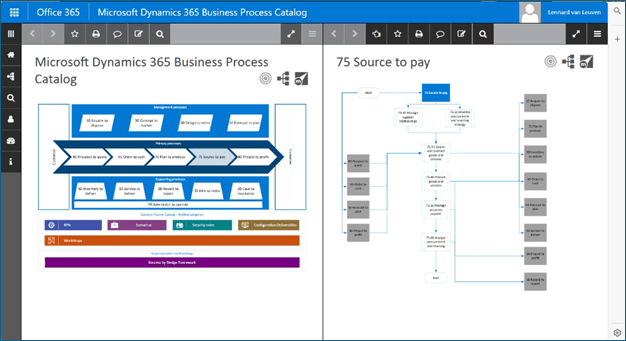
To navigate the business process catalog in Mavim,
- Access the business process catalog
- Understand the high-level structure
- Drill down into end-to-end processes
- Navigate to lower-level processes
- View detailed process diagrams
- Explore connections between processes
- Navigate back
- Access additional process information
- Understand configuration deliverables
- Understand scenarios or patterns
- Use dashboards for strategic overview
FAQs
- Can the business process catalog be customized?
- Yes
- What industries can benefit from using the business process catalog?
- It’s designed to be versatile and can benefit a wide range of industries, including manufacturing, retail, finance, healthcare, and more.
- Does the business process catalog integrate with other Microsoft tools and services?
- Yes, the catalog in Mavim can integrate with Azure DevOps, Power Automate, Dynamics 365 and more.
 The Low-Code Logbook
Leave a comment